Details
Stop starting from scratch every time. Here's the smarter way to use AI.
 If you've tried ChatGPT and found it useful but inconsistent — sometimes brilliant, sometimes frustratingly generic — there's a simple reason for it.
Every time you start a new conversation, the AI has no memory of your business, your customers, or what you're trying to do. You're essentially briefing a new assistant from scratch every single time. That's why results vary.
There's a straightforward fix for this, and once it's in place, every conversation you have with ChatGPT becomes faster, sharper, and far more relevant to your actual business.
What ChatGPT Projects Are
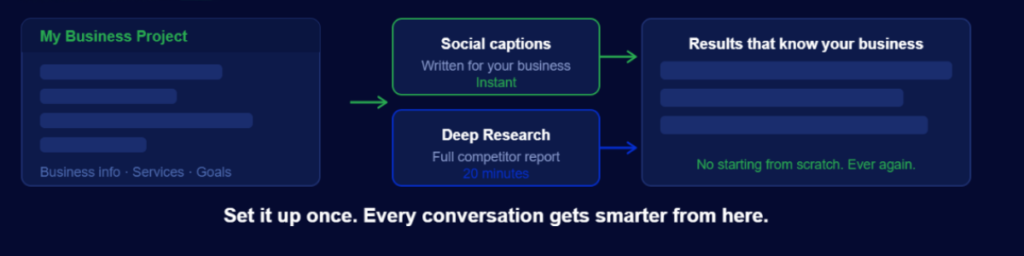
A Project is a dedicated space inside ChatGPT where you store everything the AI needs to know about your business. Before it replies to anything, it reads that information first. You set it up once, and from that point on, every conversation within that Project starts from a place of context rather than from zero.
Think of it like properly onboarding a new team member — except you only have to do the briefing once, and they never forget anything you tell them.
This is available on the free version of ChatGPT.
How to Set One Up — Step by Step
Step 1 — Create your Project
Open ChatGPT and look for the Projects section in the left-hand sidebar. Click New Project and give it a name — something like 'My Business' or '[Your Business Name] — Marketing'.
Step 2 — Ask ChatGPT what to add
Inside your new Project, ask ChatGPT directly:
"I run a [type of business] in [your area]. What files and information should I add to this project to get the best results from you?"
It will give you a specific list tailored to your type of business. Follow it. The suggestions are practical and don't require anything complicated to put together.
Step 3 — Write your project instructions
This is the most important part. Tell ChatGPT:
- What your business does
- Who your customers are (age, location, what they're looking for)
- What your goals are (more bookings, more local visibility, more reviews)
- How you want it to communicate (plain language, friendly tone, short sentences)
If writing this feels daunting, ask ChatGPT to do it for you: "I'll describe my business in a couple of sentences — can you turn that into a project brief?" It will.
Step 4 — Upload useful documents
Add any relevant files you have:
- Your current website copy
- Your service list and pricing
- Any previous content you're happy with (social media posts, emails, brochure text)
The more context it has, the better every answer becomes. Even a one-page description of your business makes a noticeable difference.
Step 5 — Use it for everything
Social media captions, website updates, email drafts, responses to customer reviews, seasonal promotions, and blog articles. Every task runs through your Project from now on. The AI already knows your business, so it stops giving you generic output and starts giving you things you can actually use.
Deep Research — A Full Competitor Report in 15 Minutes
Once your Project is set up, there's a second feature worth knowing about: Deep Research.
This is one of the most genuinely useful and underused tools available to small businesses right now. Instead of you spending hours researching competitors, market trends, or what customers are searching for, Deep Research does it automatically. It searches dozens of sources and produces a detailed written report, the kind of analysis that used to take hours or cost money to commission.
Free plan: 5 uses per month Paid plan (£20/month): 25 uses per month
Each search takes around 15–20 minutes to complete. Here are three ways to use it that are relevant to any local business:
Use 1 — Competitor Analysis
Ask Deep Research to compare your business against three or four similar businesses in your area. It will look at their websites, reviews, social media presence, and how they describe their services — and come back with a clear picture of where you stand and where the gaps are.
This alone can save hours of manual research and tell you things you might not have noticed yourself.
Use 2 — What Your Customers Are Actually Searching For
Ask it to find out what questions and search terms people use when looking for your type of service in your area.
The answers feed directly into two things:
- Improving the copy on your website pages
- Strengthening the description on your directory listing
When your words match the words your customers are using to search, Google and AI tools are more likely to recommend you.
Use 3 — Marketing Approaches That Are Working Right Now
Ask it: "What marketing approaches are performing well for [type of business] in [your region] in 2026?"
It will search current sources and come back with specific, actionable suggestions — not generic advice about "posting consistently" or "engaging your audience." Real, current examples of what's actually working.
Saving Research to Your Project
Once a Deep Research report comes back, save it into your ChatGPT Project. The AI can then reference it in future conversations, building on what it already knows about your market and your competitors.
Over time, your Project becomes more specific and useful the more you put into it. It's not a one-off task — it's a foundation you build on gradually.
How This Connects to Your Directory Listing and Website
Use your Project to keep your public-facing content sharp.
Ask ChatGPT to rewrite your business description using the keywords that came back from your Deep Research. Ask it what events or offers would work best for your type of business based on what's performing locally. Ask it to draft a response to a recent review.
If you're listed on a local business directory platform, a well-written, keyword-informed description makes a direct difference to how often your listing appears in local search results. Getting ChatGPT to help you write it — based on real research into what your customers search for — takes around ten minutes, and the results are immediate.
One Practical First Step
Once your Project is set up, try asking it this question:
"What are the most common questions people ask before booking or buying from a business like mine?"
Then take the answers and add them to your website — either as an FAQ section or woven into your service descriptions. The same questions and answers can go into your directory listing description, too.
It takes about ten minutes. It directly improves both how people find you and how confident they feel about getting in touch when they do.
Free tools mentioned in this article:
- ChatGPT — set up your Project here, free version available
- Perplexity — an alternative AI research tool, useful for checking competitor visibility
- Google Gemini — Google's own AI, useful for local search insights